Guide ·
Bluebook Parental Controls: What to Change on the Testing Device
Check Bluebook’s device settings before the SAT: interfering controls, app updates, Apple system upgrades, school-managed devices and separate phone rules.
On this page8 sections
College Board’s Bluebook checklist asks families to disable parental controls and content filters on the device used for testing. If your student has a laptop and a separate phone, that instruction belongs to the laptop. Bluebook cannot run on the phone.
The 3 October 2026 SAT makes the question timely, but this settings review can help with a later test, too. Start preparation early: College Board’s personal-device guide begins at least 30 days before testing. The final morning check confirms work already done.
Start with the actual testing device
Bluebook’s approved devices are Windows or Mac devices, iPads and school-managed Chromebooks. Personal Chromebooks and mobile phones are excluded.
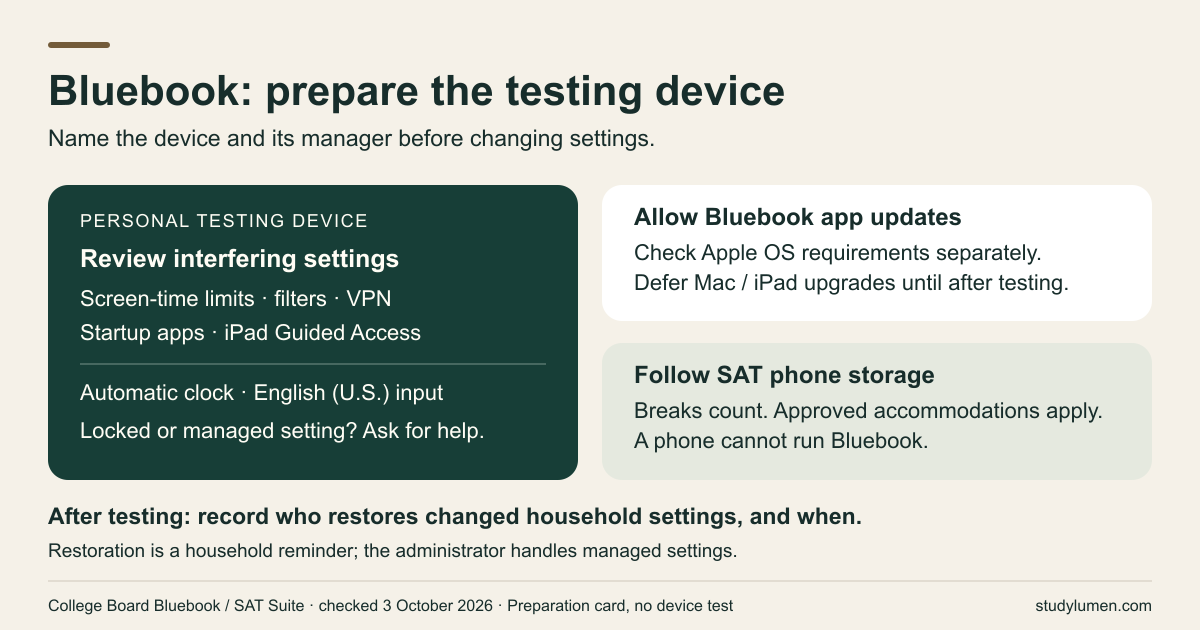
Write down the device your student will bring and who manages its settings. SAT Weekend allows a personal or school-managed device. For SAT School Day, PSAT assessments or digital AP Exams at the student’s own school, ask whether the school permits personal devices. A family laptop checklist should not become instructions to remove a school’s controls.
The testing device and a phone used for revision at home have different jobs. Our exam-week phone plan covers the phone’s role before, during and after an exam; the checklist here covers Bluebook’s testing device.
Settings to check on a personal testing device
College Board’s required-settings page lists these changes:
- Turn off screen-time limits and other parental controls that could interrupt testing.
- Disable content filtering and a VPN.
- Stop apps that launch automatically, including messaging software and writing assistants such as Grammarly. During testing, Bluebook must run alone.
- On an iPad, switch off Guided Access, even if you normally use it to keep a child in one app.
Also check that the device uses automatic date and time, its keyboard input is English (U.S.), and Bluebook can update itself. That last requirement concerns the Bluebook app. It does not tell you to install a new operating system just before the test.
Keep Bluebook current; check Apple system upgrades separately
The preparation guide tells students to close and reopen Bluebook before testing so they use the current app. Allowing that app update and upgrading macOS or iPadOS are separate decisions.
On 3 October 2026, the approved-devices page listed macOS 15 and iPadOS 18 as minimums, with recommended maximums of macOS 26.6.2 and iPadOS 26.6.1. It advises waiting until after the test to upgrade the Mac or iPad. Check the current requirements for your test date rather than treating these version numbers as permanent.
Apple’s 29 September family guide announcement creates an understandable competing task: its new Screen Time experience requires version 27 software throughout the Family Sharing group. Apple Support also requires the organizer or a parent to update the group’s parental controls. Families that cannot update every device can keep using the previous controls. The StudyLumen guide to that setup explains the family update in more detail.
You can leave that family upgrade for later while preparing an eligible testing device. If Bluebook’s device check says the current operating system does not meet requirements, get help resolving it early. If the device already has a newer system, ask the test coordinator about its readiness; the listed recommended maximums do not establish that version 27 will fail, and this article is not a compatibility test or a downgrade instruction.
When a school device or locked setting needs help
For a school-managed Windows or Apple device, College Board assigns installation and required settings to the school. It says to ask for help before test day: students and test-center staff may lack the permissions to fix a problem that morning. At the student’s own school, the school prepares its managed devices for AP, SAT School Day and PSAT testing.
Apple also says that some controls cannot be removed for certain ages and regions. If you cannot change a setting, bring the exact issue to the device administrator or test coordinator before testing. Let them resolve the preparation question instead of trying to get around management or mandatory restrictions.
SAT phone rules apply during breaks, too
College Board’s SAT prohibited-devices page says students cannot access phones or smart wearables during testing or breaks unless a College Board–approved accommodation applies. Staff collect prohibited devices or require storage away from the desk; possession may also prevent admission.
A prohibited device making noise, or a student being seen with it, can lead to dismissal, canceled scores and confiscation. Follow the center’s storage instructions. Changing the testing laptop’s settings gives no permission to use a separate phone at the center.
A card to keep with the testing device
Fill this in during preparation. The last row is a household reminder we suggest, rather than a College Board requirement. For settings managed by a school, the administrator decides what can be restored and when.
Bluebook testing-device review card
- Check
- Device and manager
- Write down
- The approved device your student will use, and the person who can change its settings.
- Check
- Personal-device settings
- Write down
- The required-settings list above, checked on that device; any locked setting still needing help.
- Check
- Bluebook app
- Write down
- App updates allowed; device check completed; unresolved issues sent to the coordinator.
- Check
- Apple operating system
- Write down
- Requirements checked for this test date; a family Screen Time upgrade kept separate.
- Check
- SAT phone storage
- Write down
- The center’s instructions, including break periods and any approved accommodation.
- Check
- After testing
- Write down
- Who will restore the household settings that were changed, and when.
| Check | Write down |
|---|---|
| Device and manager | The approved device your student will use, and the person who can change its settings. |
| Personal-device settings | The required-settings list above, checked on that device; any locked setting still needing help. |
| Bluebook app | App updates allowed; device check completed; unresolved issues sent to the coordinator. |
| Apple operating system | Requirements checked for this test date; a family Screen Time upgrade kept separate. |
| SAT phone storage | The center’s instructions, including break periods and any approved accommodation. |
| After testing | Who will restore the household settings that were changed, and when. |
The separate phone plan for revision at home
If revision uses a supervised Android phone, a StudyLumen Exam Focus routine can apply one selected rule set for that study block. Set the block’s end time alongside the practice tools you intend to allow; this is separate from preparing Bluebook’s testing device.
An extra practice tool can use a temporary access request with a recorded end time. StudyLumen does not configure Bluebook or Apple’s Screen Time. The phone plan carries your household decision into the revision session; it does not promise a higher test score.
Sources
- College Board: prepare a personal device — preparation stages and who handles device settings.
- College Board: required settings for personal devices — app updates, clock, keyboard and interfering settings.
- College Board: approved devices — device eligibility and current operating-system requirements.
- College Board: prepare a school-managed Windows or Apple device — school responsibility and help before test day.
- College Board: 3 October 2026 SAT date — the dated SAT Weekend hook.
- College Board: prohibited SAT devices — phone storage, breaks and accommodation exception.
- Apple Newsroom: family digital-habits guide — published 29 September 2026; family-wide update availability.
- Apple Support: set up parental controls — family activation, previous controls and settings that cannot be removed.