Blog ·
Teachers Want Less Device Time in Class. Homework Still Needs a Named Job.
A 2026 teacher poll favored classroom guardrails and offline options. Here is how to turn that finding into a precise homework-phone plan.
On this page6 sections
The teacher-screen-time headline is still open on the laptop. At the kitchen table, a parent opens Family Link and starts typing a two-hour Daily Limit on the phone.
The instinct makes sense. The clocks do not match.
The survey behind the headline asked teachers about learning devices used during class: laptops, Chromebooks, tablets and e-readers. It did not follow a child through an evening assignment, and it did not ask how long a personal phone should stay available after school. The useful lesson is more specific than “less screen time.” Give the device a job before giving it a number.
The poll counted classroom devices, not homework phones
Gallup, the Walton Family Foundation and the Joan Ganz Cooney Center surveyed 2,101 U.S. public K–12 teachers through RAND's American Teacher Panel from 6 to 29 May 2026. The full sample has a margin of sampling error of ±2.6 percentage points. Questions about learning devices went only to teachers whose students used them.
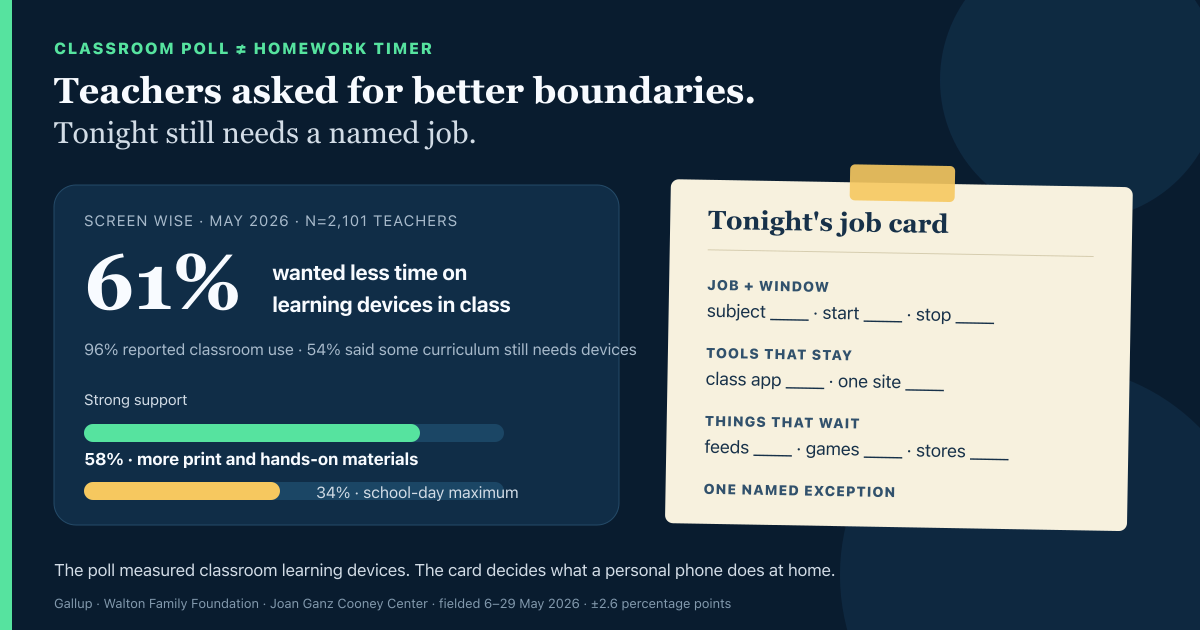
Among those teachers, 96% said students used learning devices in class and 80% said students had their own assigned device. 61% wanted students to spend less class time on those devices; 6% wanted more and 33% wanted about the same amount. At the same time, 54% said parts of the required curriculum could not be taught properly without devices.
That combination matters. Many teachers wanted less device time without pretending the devices could disappear. The report describes a classroom tradeoff: keep the tools that instruction requires, then put clearer boundaries around the rest.
It says nothing about whether a tighter phone limit improves grades. It also does not turn a school-issued Chromebook into a parent-managed device. The school-device boundary still applies when homework crosses the front door.
Teachers put alternatives and guardrails ahead of one clock
The survey asked about six possible school-day guardrails. Support was broad, but the strongest backing went to choices that changed what happened on the device—or replaced it—not to a universal timer.
- School-day proposal
- More high-quality print and hands-on materials
- Strongly support
- 58%
- What it changes
- Gives a class a real non-screen option
- School-day proposal
- Stronger filtering or monitoring of learning devices
- Strongly support
- 54%
- What it changes
- Changes what the classroom device can reach
- School-day proposal
- Clearly defined exceptions
- Strongly support
- 48%
- What it changes
- Names when the general rule should bend
- School-day proposal
- A maximum amount of device time in the school day
- Strongly support
- 34%
- What it changes
- Adds one clock across classes
| School-day proposal | Strongly support | What it changes |
|---|---|---|
| More high-quality print and hands-on materials | 58% | Gives a class a real non-screen option |
| Stronger filtering or monitoring of learning devices | 54% | Changes what the classroom device can reach |
| Clearly defined exceptions | 48% | Names when the general rule should bend |
| A maximum amount of device time in the school day | 34% | Adds one clock across classes |
Strong and somewhat strong support for a school-day maximum adds up to roughly 73%. That is a real finding, but it is not the whole one: 27% opposed the idea, only 7% said their school or district already had such a limit, and coordination looked hardest where students changed classes. 71% of high-school teachers and 64% of middle-school teachers said a daily maximum would be difficult to coordinate. A slim majority of elementary teachers, 51%, thought it would be easy.
One number sounds tidy until several teachers need different tools at different times. The same problem appears at home when “two hours” has to cover a maths portal, a printer page, a group chat and whatever was already open.
A Daily Limit still cannot name the assignment
Family Link's Daily Limit is a device control. Google's help explains that the limit applies to the child's Android devices and Chromebooks; it is not labelled “homework,” and it does not know whether the remaining minutes belong to an assignment.
Apps marked Unlimited do not count toward that Daily Limit and can remain available after it is reached. They may also be allowed during Downtime or School time. That can be useful for a class app or calculator. It becomes a leak when a broad browser or video app survives because it is “sometimes educational.”
Downtime and School time are weekly schedules. They can hold an app list, but the schedule still does not know what tonight's teacher assigned. The School time and homework comparison is worth checking before copying a school-day setup into the evening.
The American Academy of Pediatrics uses homework as one example of a family screen-free zone and tells families to revisit the plan often. On a digital assignment, the practical reading is not “remove every screen.” It is “remove the screens that are not doing the assignment.”
Write the job before you set the limit
Put four lines on paper while the assignment is visible. Concrete nouns help: “Algebra worksheet in Classroom” is a plan; “school stuff” is not.
- Line
- Job and window
- Tonight's answer
- Subject ____ · start ____ · stop ____
- Watch for
- “Until it is done” with no end time
- Line
- Tools that stay
- Tonight's answer
- Class app ____ · calculator ____ · one site ____
- Watch for
- Allowing the whole browser for one page
- Line
- Things that wait
- Tonight's answer
- Feeds ____ · games ____ · stores ____
- Watch for
- Leaving a feed available because one video might be useful
- Line
- Named exception
- Tonight's answer
- App or site ____ · for ____ minutes
- Watch for
- A silent full-phone unlock
| Line | Tonight's answer | Watch for |
|---|---|---|
| Job and window | Subject ____ · start ____ · stop ____ | “Until it is done” with no end time |
| Tools that stay | Class app ____ · calculator ____ · one site ____ | Allowing the whole browser for one page |
| Things that wait | Feeds ____ · games ____ · stores ____ | Leaving a feed available because one video might be useful |
| Named exception | App or site ____ · for ____ minutes | A silent full-phone unlock |
If the worksheet is on paper, the phone's only job may be “available for pickup calls.” If the assignment needs a portal, printer companion and calculator, name those three instead of granting a category. The always-on tools guide shows what that smaller list looks like.
A Daily Limit can remain as a ceiling if it helps your household. Just keep it in its lane. The paper card explains the work; the limit counts device time.
When the card needs to run on schedule
Paper is enough for many evenings. StudyLumen is useful when a family wants the same named window to repeat on a supervised personal Android. One routine activates one rule set, so the class app and calculator can remain available while selected apps pause; website filtering is optional rather than implied by the app list.
If the assignment changes, a supervisor can answer a request for one named app, site or extra-time target. The grant ends at its recorded end time. That keeps the exception attached to tonight's job instead of turning it into an open-ended unlock. StudyLumen does not administer a school account or a school-owned Chromebook; the Family Link comparison covers the different roles.
Sources
- Gallup, Screens Are Ubiquitous in Classrooms, but Teachers Are Split on Their Efficacy, published 16 September 2026.
- Walton Family Foundation, Gallup and Joan Ganz Cooney Center, Screen Wise: What Teachers Say About Making Classroom Technology Work, fielded 6–29 May 2026.
- Joan Ganz Cooney Center, Screen Wise report page, retrieved 23 September 2026.
- Google For Families Help, Manage screen time, retrieved 23 September 2026.
- Google For Families Help, Set app time limits, retrieved 23 September 2026.
- Google For Families Help, Set a schedule, retrieved 23 September 2026.
- American Academy of Pediatrics, How to Make a Family Media Use Plan, retrieved 23 September 2026.