Blog ·
A School Can Ban the Glasses. It Cannot Set Tonight’s Homework Rule.
Western Australia's smart-glasses instruction starts at school, not at home. Use a three-line card for the homework window, needed apps, and exceptions.
On this page6 sections
On 12 October, a student at a Western Australian government school may have to leave smart glasses off campus. That student could still need a class app on a phone at home that evening. The school instruction covers the first situation; it does not make the second decision for a family.
What changes at school on 12 October
The Western Australian Department of Education's CEO Instruction starts on 12 October 2026. It tells principals of government schools to ensure students and staff do not wear, use, charge, or store smart glasses on school premises or at school-organised activities. Parents, carers, visitors, and contractors must not bring them onto the site or to those activities. The department announced the instruction on 22 September.
The instruction also lets a principal approve glasses for a school-approved medical, accessibility, or assistive-technology purpose, or for a specifically authorised educational program. That is a school decision, made under the instruction's privacy and child-protection requirements. A family should use the school's process for a needed accommodation, not assume a blanket exception.
This is a rule for Western Australian government schools, not a rule for every school or for the kitchen table. The department says government residential colleges will be covered through a separate mechanism. It does not tell a family which device to use for homework.
The rule covers more than a camera
The instruction describes smart glasses by the technologies they may use: audio or video recording, photography, AI, internet access, information retrieval, and communication, among others. Its wording is not a simple camera test. If a household is unsure how a particular pair is treated on campus, the school can apply the instruction to that device; a product label alone cannot settle the question.
At home, the practical question is different. Should connected glasses stay on a student's face while an assignment is underway? The answer can depend on the assignment and on an existing accessibility plan. A school-site prohibition does not supply a home schedule, and a home schedule cannot override an approved school accommodation.
Put the homework decision on one card
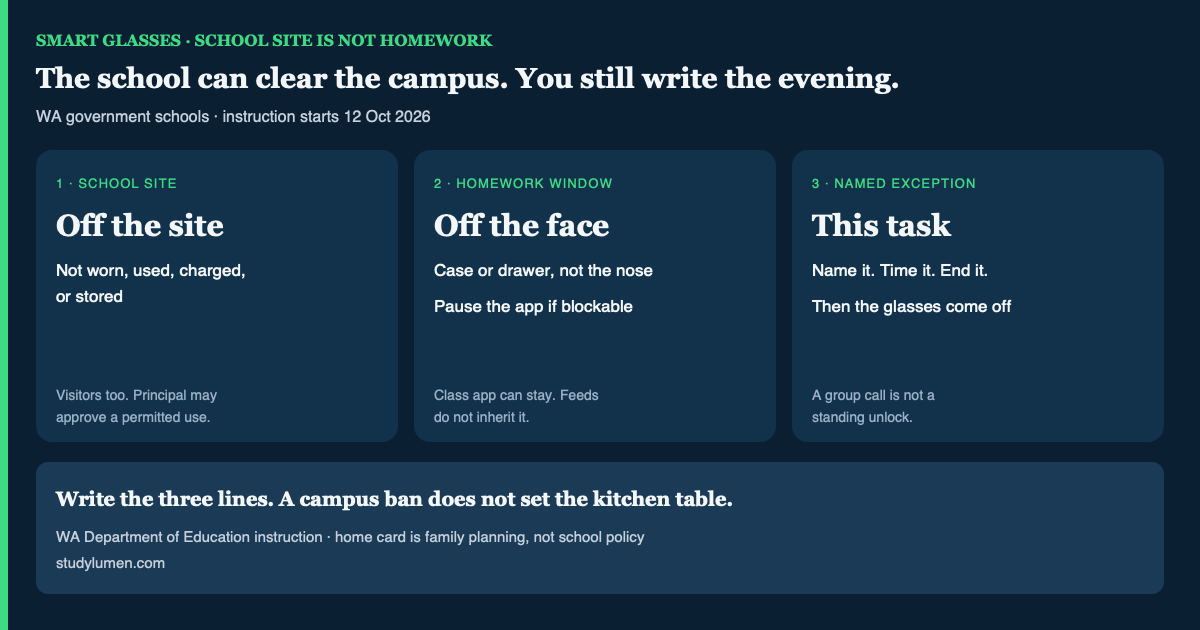
Three lines are enough to make the boundary usable. Name the homework window. Decide where the glasses go during that window. Then name any task that genuinely needs them, with an end time. A group-project call might qualify for ten minutes; it need not leave the glasses on for the rest of the evening.
Who sets the smart-glasses rule at school and at home
- Moment
- On a WA government-school site from 12 October
- Who decides
- The principal applies the CEO Instruction.
- What to write down
- Glasses stay off site unless the principal approves a permitted use.
- Moment
- During homework at home
- Who decides
- The household, alongside any existing access plan.
- What to write down
- The window, where the glasses rest, and which class app remains available.
- Moment
- For a needed exception
- Who decides
- The person responsible for that setting.
- What to write down
- The specific task, how long access lasts, and what happens when it ends.
| Moment | Who decides | What to write down |
|---|---|---|
| On a WA government-school site from 12 October | The principal applies the CEO Instruction. | Glasses stay off site unless the principal approves a permitted use. |
| During homework at home | The household, alongside any existing access plan. | The window, where the glasses rest, and which class app remains available. |
| For a needed exception | The person responsible for that setting. | The specific task, how long access lasts, and what happens when it ends. |
The American Academy of Pediatrics' family media plan gives “during homework” as one example of a screen-free zone a family might choose. It is an example for planning, not evidence that a particular glasses rule changes grades or health.
A phone setting cannot take off the glasses
A school may put glasses away while an assignment still lives in a class app. That is why the card should name the app, rather than treating the whole phone as either allowed or forbidden. The same distinction matters when the learning-management system is on the phone.
Google's Family Link app controls can limit or block eligible apps on a supervised device, but some system apps cannot be blocked. Its Unlimited apps can remain available during Downtime or School Time on supported Android devices; a manual lock handles them differently unless the setting is changed. Those controls act on apps, not on eyewear. If a glasses companion app cannot be blocked, keep the physical “off the face” line on the card.
Where StudyLumen fits
StudyLumen can apply a scheduled rule set to selected apps on a supervised personal Android phone. A family can leave a needed class app available and pause a blockable companion app or feed during the homework window; website filtering is optional. A temporary phone-app access request can handle a bounded exception. None of that detects, disables, or supervises the glasses themselves. The family still has to agree on where the pair goes.
Start by writing down the window and the needed app. If an existing medical or accessibility plan calls for the glasses, follow that plan and coordinate the school-site part with the school.