Blog ·
Where Will the Phone Charge During Homework?
Make a practical charging plan around the assignment: name the device, its place, any required phone task and who can resolve an access problem.
On this page5 sections
The laptop has the assignment, but the phone has the class message and the only charger is beside the desk. “Put the phone away” leaves several choices unanswered. Name where it charges, what job it still has, and what happens if the student needs it for the task.
A physical arrangement and an app rule do different jobs. A charging plan should explain both without promising a particular change in screen time.
Find out whether the assignment needs this phone
Read the task and identify the material the student must open. If the work is on paper or another device, choose a place for the phone that suits the household. If the phone is needed, name the specific tool and when it is needed before choosing where it will sit.
That question is more useful than treating every charging location as a rule for every assignment. A student reading instructions on a phone has a different arrangement from one working entirely on a school laptop.
- Part of the plan
- Physical place
- Record
- The phone, charger and agreed location
- Question to settle
- Can the arrangement work while the task is being done?
- Part of the plan
- Homework use
- Record
- The required tool or material, if any
- Question to settle
- Does this assignment actually need the phone?
- Part of the plan
- Contact
- Record
- The household’s agreed way to reach the student
- Question to settle
- Who should handle a changed pickup or other message?
- Part of the plan
- App access
- Record
- The tool, intended window and person managing the rule
- Question to settle
- Who can resolve a required tool that will not open?
| Part of the plan | Record | Question to settle |
|---|---|---|
| Physical place | The phone, charger and agreed location | Can the arrangement work while the task is being done? |
| Homework use | The required tool or material, if any | Does this assignment actually need the phone? |
| Contact | The household’s agreed way to reach the student | Who should handle a changed pickup or other message? |
| App access | The tool, intended window and person managing the rule | Who can resolve a required tool that will not open? |
Keep the note near the work rather than adding private messages or account details. It should tell a family member what to do, not collect a usage history.
Use research for its actual question
Lopez and colleagues’ 28 October 2026 paper in PLOS Digital Health analyzes reported digital-parenting patterns and adolescent screen use in the U.S. ABCD study. Its youth-reported screen-time measure excludes school-related work.
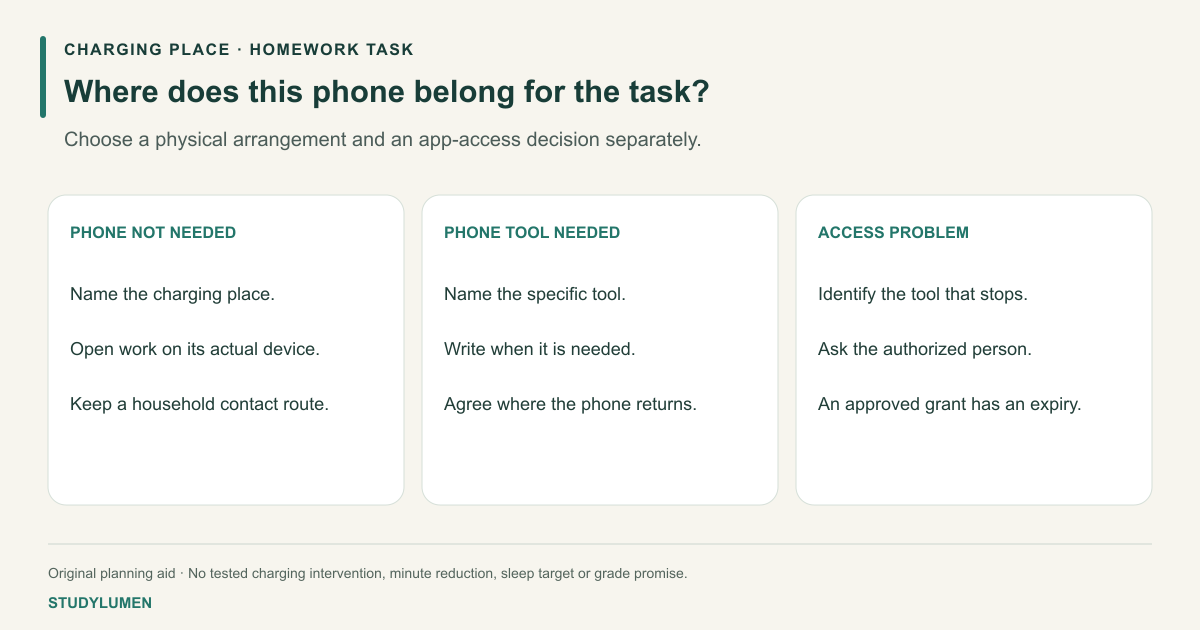
This is an observational analysis, not a trial of the charging arrangement on this page. The card below is our own planning aid; the paper supplies no effect estimate for following it. It would be misleading to promise that choosing a charging place removes a specified number of minutes or improves sleep or grades.
Write an arrangement someone can follow
For work that uses another device, a household might write: “Phone charges at the agreed spot; class instructions are open on the laptop; ask the parent if a required link is only on the phone.” This is an example to adapt, not a measured or recommended schedule.
If a phone tool is required, write which tool and the point in the task when it is used. Decide how the phone returns to the charging arrangement afterward. If a school-managed device or a locked setting prevents access, ask the school or administrator about that exact issue.
Review whether the arrangement was workable when the task changes. A shared charger, a different device or a new class tool may need a new answer. Keep that practical review separate from claims about concentration, sleep or academic results.
Save a digital routine only if you need one
On a supervised Android phone, a StudyLumen homework routine can apply one selected app rule set during the agreed work window. The supervisor saves the routine; writing a charging location on paper does not change app access.
A temporary access request changes StudyLumen access only after approval and ends at its recorded expiry. That approval does not move the phone, silence notifications or lift another app’s or the school’s controls. Keep the physical arrangement on the note even when an app handles the scheduled rule.
Sources
- Lopez et al.: digital parenting and screen use. PLOS Digital Health, published 28 October 2026; methods and observational scope.