Blog ·
California Is Changing Under-16 Feeds in 2027. That Won't Set Tonight's Homework Rule.
California AB 1709 changes feeds and autoplay for users under 16 in 2027. For homework, decide whether the problem is minutes, pickups, or alerts.
On this page6 sections
The Family Link counter can show 47 minutes left while a worksheet has already been interrupted six times. Nothing is wrong with the counter. It is answering how long. The household is struggling with how often.
California's new under-16 platform law makes that difference timely. It changes which engagement features covered platforms may provide next year. It does not choose the phone's place on tonight's homework table.
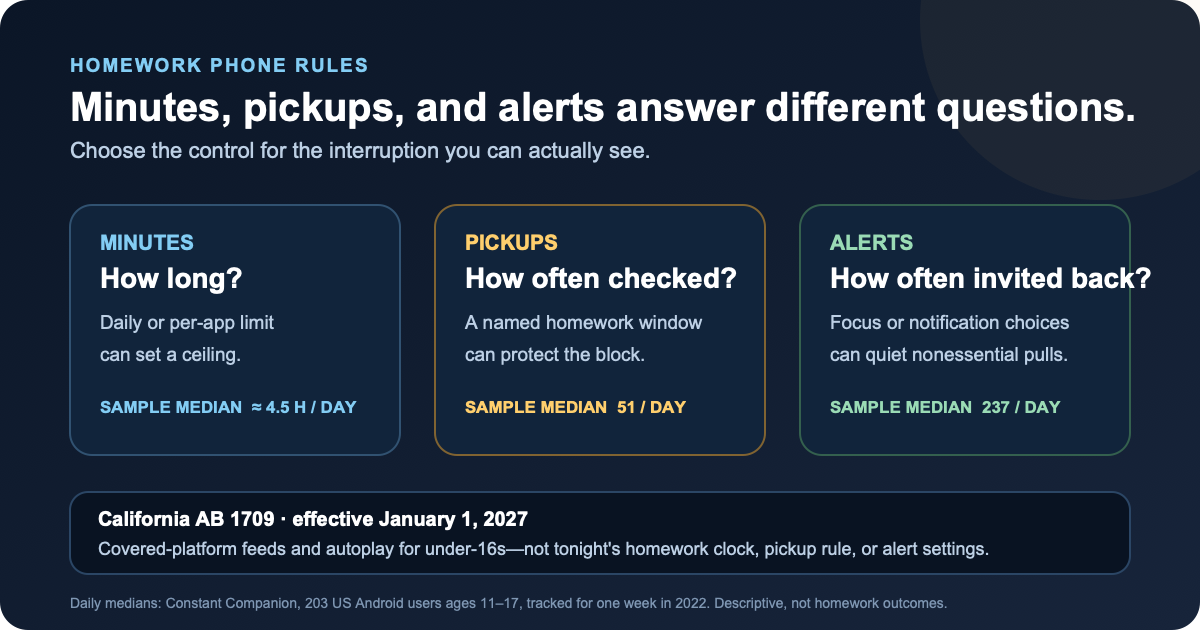
On January 1, the platform changes—not the kitchen clock
California chaptered AB 1709 on September 10, 2026. Business and Professions Code section 22683 says a covered platform shall not provide an “addictive feature” to a user under 16. Section 22682 defines that term as an addictive feed, autoplay, or another feature later defined by the Attorney General. An under-16 user may still create or keep an account when the platform does not provide those features.
The bill's status page lists it as chaptered and non-urgency. Its sponsor, Common Sense Media, says the law takes effect January 1, 2027. It is not a rule already changing a child's feed today.
Nor is it a school-phone law, daily screen allowance, homework schedule, pickup cap, or notification setting. The legislative findings discuss notifications and infinite scroll, but the enacted definition names addictive feeds and autoplay; another feature would require later Attorney General action under the statute. For a legal decision, use the chaptered text and qualified counsel. Here, the statute is useful for one narrower comparison: platform design and household timing are different jobs.
A phone can use few minutes and still be checked 51 times
Common Sense Media's Constant Companion tracked 203 US 11- to 17-year-olds with their own Android phones for one week between August and November 2022. The sample was Android-only because the researchers could not obtain the same app-name data from iPhones.
On a typical day in that sample, median phone use was almost four and a half hours, the median number of pickups was 51 (with a range of 2 to 498), and the median number of delivered notifications was 237. Participants saw or engaged with a median of 46 notifications. About 23% arrived during school hours and about 5% during school-night hours.
Three smartphone metrics from the Constant Companion study
- Metric
- Minutes
- Question it answers
- How long was the phone in use?
- Typical-day median in this sample
- Almost 4.5 hours
- Metric
- Pickups
- Question it answers
- How often was the phone picked up or checked?
- Typical-day median in this sample
- 51
- Metric
- Notifications
- Question it answers
- How often did apps try to draw attention?
- Typical-day median in this sample
- 237 delivered; 46 seen or engaged with
| Metric | Question it answers | Typical-day median in this sample |
|---|---|---|
| Minutes | How long was the phone in use? | Almost 4.5 hours |
| Pickups | How often was the phone picked up or checked? | 51 |
| Notifications | How often did apps try to draw attention? | 237 delivered; 46 seen or engaged with |
Those are whole-day descriptive figures from a small, older Android sample. They are not medians for homework, California, every teenager, or 2026. The study did not test grades or prove that a pickup caused an interruption. It does explain why “under the daily limit” and “the homework block stayed together” can both be honest descriptions of the same evening.
Pew's 2025 report offers a separate piece of context: among US parents of children 12 and younger, 86% said they had some rule about when, where, or how screens could be used, while 19% of the full sample said those rules held all the time (full report). That is a parent survey with a different age group, not a pickup log. Its practical lesson is modest: having a rule and carrying it through are different things.
Match the control to the interruption
Start with the evening you can see. If the problem is a long recreational session, a daily minute ceiling may fit. If the child keeps checking a silent lock screen, moving the phone may matter more. If banners and sounds keep arriving, deal with alerts.
Homework phone control matched to the interruption
- What happens during homework
- Recreation runs for a long time
- A control that matches
- Daily or per-app time limit
- Keep available
- Required homework tools
- What happens during homework
- The phone is checked again and again
- A control that matches
- Named homework window; phone face-down or out of reach when not needed
- Keep available
- A clear way to ask for it
- What happens during homework
- Alerts keep pulling attention
- A control that matches
- Focus mode or app-level notification choices
- Keep available
- Calls and messages the family considers essential
- What happens during homework
- An assignment needs one blocked app or site
- A control that matches
- Named, time-limited exception
- Keep available
- Only that resource, until the recorded end
| What happens during homework | A control that matches | Keep available |
|---|---|---|
| Recreation runs for a long time | Daily or per-app time limit | Required homework tools |
| The phone is checked again and again | Named homework window; phone face-down or out of reach when not needed | A clear way to ask for it |
| Alerts keep pulling attention | Focus mode or app-level notification choices | Calls and messages the family considers essential |
| An assignment needs one blocked app or site | Named, time-limited exception | Only that resource, until the recorded end |
The card is not a universal sequence. Some households need only one row. Choose the smallest rule that fixes the visible problem, write a start and end, and review what happened after a few school nights. A law that changes feeds in 2027 does not require a family to wait until 2027 to move a phone, mute a banner, or clarify an exception.
Android splits these jobs across several controls
Family Link daily limits answer the minutes question. Google says a limit applies to each Android device or Chromebook: two hours means two hours on each device, not two hours shared across the household. Bonus time adds time for the day without rewriting the daily limit, Downtime, or School time schedule.
Unlimited-time apps can remain available after the daily limit and, if a parent chooses, during Downtime or School time. They do not count toward the daily limit. A manual device lock has separate behavior, so check the actual lock setting rather than assuming “Unlimited” always means reachable.
On the phone itself, Digital Wellbeing can show screen time, times opened, and notifications received. Focus mode can pause selected apps and their notifications on a schedule or until it is turned off. Google does not publish a universal unlock median on that help page, and steps can vary by device.
Android notification controls work at the app and notification-category level. Notification cooldown can reduce sounds and pop-ups during a burst, with exceptions including calls, alarms, priority conversations, and emergency alerts. Availability and labels vary by Android version and manufacturer. None of these controls is AB 1709; they are the device-side choices a household can make now.
The minutes-versus-study-windows guide goes deeper on the first distinction. Notifications during study covers the third.
If the supervised phone should follow the homework block
Paper and stock Android controls may be enough. On a supervised Android device, StudyLumen can tie a scheduled routine to one rule set, keep selected apps or websites available, and let a parent approve a named temporary-access request with a recorded end. That maps to the homework window rather than to California's platform rule. Temporary access requests shows the exception flow.
Android's own settings still own notification behavior. StudyLumen does not rewrite social platforms, interpret California law, read chats, manage a school Chromebook or iPhone, or promise concentration or grades. Its job in this scenario is the agreed clock, app or site boundary, and bounded exception—not every reason a phone may be picked up.
Sources
- AB 1709 chaptered text — California Legislative Information; Chapter 183, approved and filed September 10, 2026
- AB 1709 status — California Legislative Information; chaptered, non-urgency measure
- Common Sense Media statement on AB 1709 — bill sponsor; January 1, 2027 effective-date statement
- Constant Companion: A Week in the Life of a Young Person's Smartphone Use — Common Sense Media, 2023; 203 US Android users ages 11–17, tracked for one week in 2022
- How Parents Manage Screen Time for Kids — Pew Research Center, October 2025; US parents of children 12 and younger
- Manage your child's screen time — Google For Families Help
- Manage your child's Google Play apps — Google For Families Help; app limits and Unlimited-time apps
- Manage how you spend time with Digital Wellbeing — Google Android Help
- Control notifications on Android — Google Android Help