Blog ·
A Lunchtime Chromebook Ban Does Not Set Tonight’s Homework Rule
Oakland's revised device resolution addresses games on school laptops at lunch and recess. It leaves homework access and the personal phone after school to be worked out.
On this page4 sections
Oakland students may soon have to put away games on a school Chromebook at lunch. A student could still be assigned a portal or typed paragraph that evening. The revised district resolution addresses the first situation; it does not write a rule for the second.
That distinction matters especially to families who rely on a school device or school internet access. It also matters before a parent copies a school headline into a setting on a personal phone.
What Oakland voted on—and what remains unposted
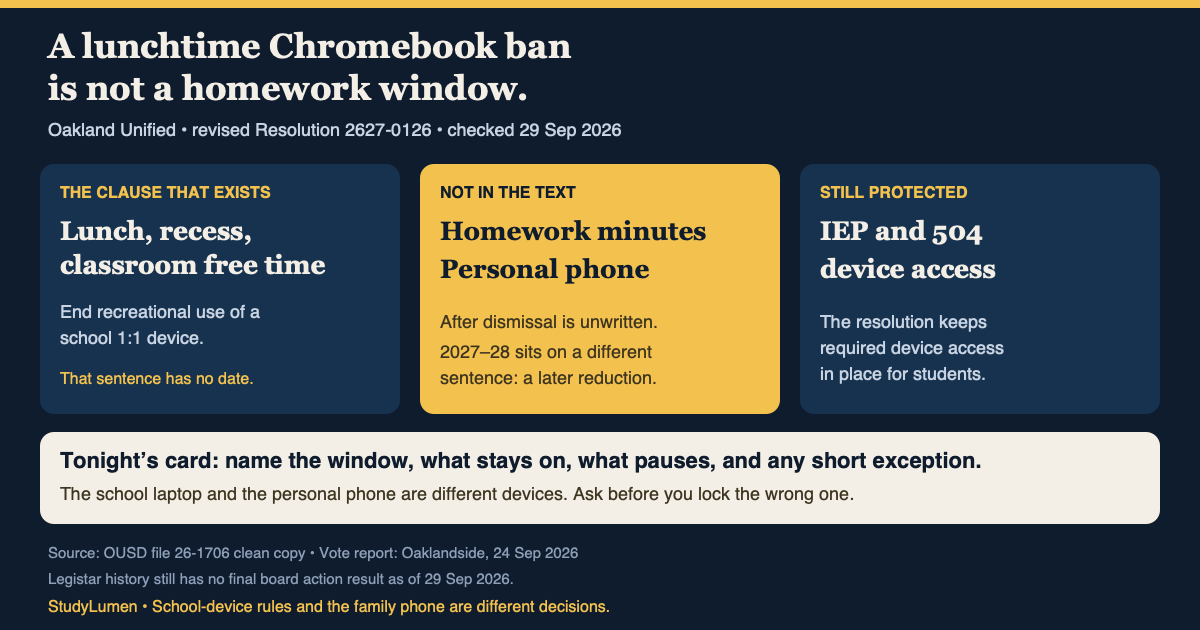
The revised Resolution No. 2627-0126, filed as 26-1706, directs Oakland Unified to end recreational use of school-issued one-to-one devices at lunch, recess and during classroom free time. It also calls for grade-based device and AI-use guidelines by the final board meeting of the 2026–27 school year. Professional learning for administrators is to prepare for a reduction of one-to-one device use beginning in 2027–28. That date belongs to the reduction clause; the recreation clause itself gives no start date.
The Oaklandside reported that the board approved the measure on 23 September with six yes votes and Director Mike Hutchinson absent. The district's Legistar file, checked again on 29 September, still shows no final board action result in its history. The reporter describes the change as beginning next fall; the clean resolution does not put that date on the recreation clause. Ask the school when it will apply rather than treating a news date as an implementation notice.
The same resolution preserves device access included in a student's IEP or mandated 504 plan. It does not set homework minutes, govern a personal phone or specify what happens to a school Chromebook after dismissal.
The lunch-access question did not vanish
In an August account of the earlier board discussion, Hutchinson raised a practical objection: some students have access to a Chromebook and internet only at school, including during lunch. The item went back for student input. In September, Director Rachel Latta told the Oaklandside that she had met with the district's student union and that its representatives supported the revised proposal. That input is worth noting, but it does not answer how a student without home access will complete an online assignment.
There are three separate decisions here:
Oakland school-device rule and household decisions
- Device and time
- School Chromebook at lunch or recess
- What the resolution supplies
- An end to recreational use, with no start date in that clause
- What a family still needs to know
- When the school will put it into practice
- Device and time
- School Chromebook for homework
- What the resolution supplies
- No homework cap or after-dismissal procedure
- What a family still needs to know
- Whether it can go home, and what an assignment requires
- Device and time
- Personal phone after school
- What the resolution supplies
- No rule
- What a family still needs to know
- Which homework tools to allow and when the window ends
| Device and time | What the resolution supplies | What a family still needs to know |
|---|---|---|
| School Chromebook at lunch or recess | An end to recreational use, with no start date in that clause | When the school will put it into practice |
| School Chromebook for homework | No homework cap or after-dismissal procedure | Whether it can go home, and what an assignment requires |
| Personal phone after school | No rule | Which homework tools to allow and when the window ends |
The first question belongs to the district. The other two cannot be answered by quoting the lunch clause.
Ask about the assignment before setting a lock
For an online assignment, ask the teacher which device is expected and whether there is a way to complete it without reliable internet at home. If the school Chromebook is needed, ask when it can be used after dismissal. Those are more useful questions than “Does the lunch ban count at home?”
If homework instead uses an existing personal Android phone or tablet, write down the study window, the class app or website that must stay available, and the games or feeds to pause. A short upload or group message may need its own timed exception. The point is to make the setting follow the assignment, not the other way around.
StudyLumen can apply a scheduled study routine and selected app rules on a personal supervised Android device; website filtering is optional, and a temporary access request can cover a named exception. It does not administer the school Chromebook or its Google account. A family using only a school laptop can use the same written plan without StudyLumen.