Blog ·
NSW Does Not Recommend a Homework Device Before Year 5
NSW's new public-school guidance discourages device-required homework through Year 4. Its classroom minute limits are a separate measure, starting from 2027.
On this page4 sections
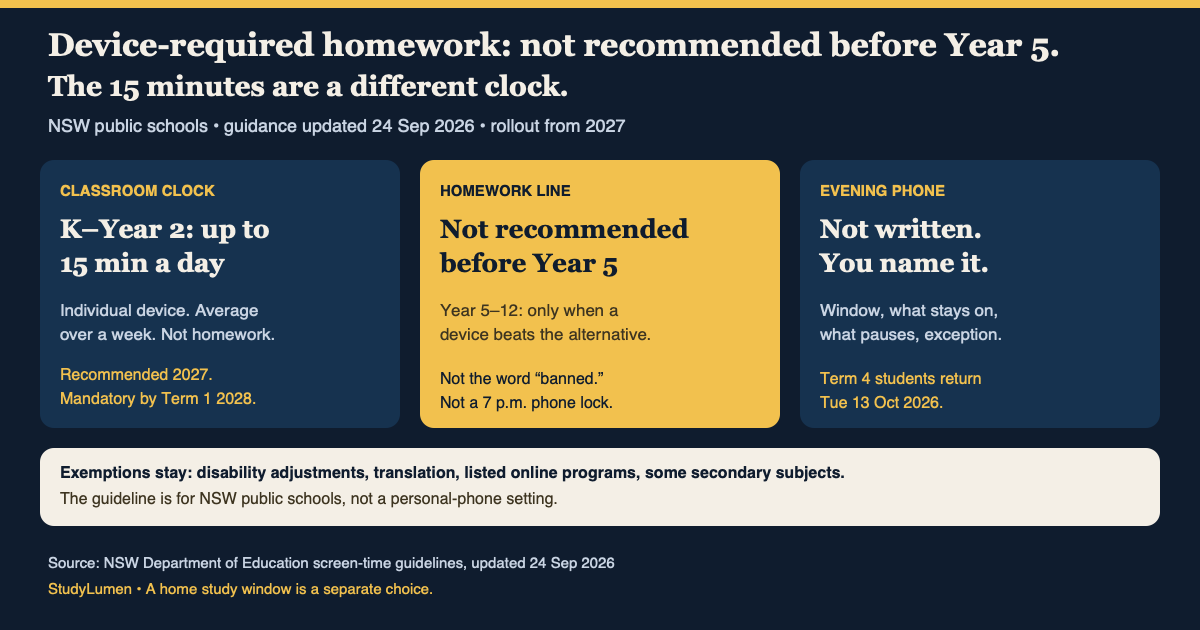
The 15-minute number in NSW's new guidance is easy to carry home by mistake. It refers to an individual device in a Kindergarten-to-Year-2 classroom, averaged over a week. It is not a 15-minute homework allowance or a timer for a family's phone.
The homework line is elsewhere on the department's guidelines page, updated 24 September: device-required homework is not recommended from Kindergarten through Year 4. For Years 5–12, the department recommends it only when a digital device is more effective for learning than the alternative. “Not recommended” is not “banned,” and the page is about NSW public schools, not every school in Australia.
Start with the homework task
The department's separate Homework K–12 advice says each school must develop and communicate its own homework guidelines. Its Kindergarten-to-Year-2 section includes reading and other non-digital work. The March homework advice does not set a screen rule; the September screen guidance adds a recommendation about when an assignment should require a device.
So if a Year 3 assignment arrives as a link, the useful question is whether the child needs a device to complete it, or whether the teacher has a paper or offline route. For an older student, ask what the digital format adds to the learning. The department has not given parents a test to administer at the kitchen table.
The classroom numbers are a different measure
The recommended maximums below concern individual student devices—laptops, desktops and tablets—during school, considered on average over one week. They are not homework limits.
NSW recommended individual-device maximums by school year
- School year
- Public preschool
- Recommended individual-device use
- None
- School year
- Kindergarten–Year 2
- Recommended individual-device use
- Up to 15 minutes a day
- School year
- Years 3–4
- Recommended individual-device use
- Up to 30 minutes a day
- School year
- Years 5–6
- Recommended individual-device use
- Up to 45 minutes a day
- School year
- Years 7–10
- Recommended individual-device use
- Up to 25% of lesson time per subject
- School year
- Years 11–12
- Recommended individual-device use
- Up to 50% of lesson time per subject
| School year | Recommended individual-device use |
|---|---|
| Public preschool | None |
| Kindergarten–Year 2 | Up to 15 minutes a day |
| Years 3–4 | Up to 30 minutes a day |
| Years 5–6 | Up to 45 minutes a day |
| Years 7–10 | Up to 25% of lesson time per subject |
| Years 11–12 | Up to 50% of lesson time per subject |
The percentages in secondary school are per subject, not a share of the whole school day. The guidelines also discourage recreation on screens at school, including during breaks. None of these figures tells a parent how long tonight's maths work should take.
The department recommends that schools begin using the guidelines in Term 1 2027 where possible, transition through 2027, and implement them by Term 1 2028. They are not a classroom cap in force during this September break. The page also preserves reasonable adjustments for learning needs, translation, listed online and distance programs, testing, and high-digital secondary subjects. A headline about 15 minutes does not cancel an individual support arrangement.
What to ask before Term 4
The 2026 calendar puts the first day of Term 4 for students on Tuesday 13 October in both the eastern and western divisions; Monday is a staff development day. A small number of border schools use different dates, so check your school's calendar.
Before the return, ask what the next homework task requires: paper, a school-managed device, or an existing family device? If it requires a device for a child in Year 4 or below, ask what non-digital option is available. If a school laptop comes home, ask how access after dismissal works. The new guidelines do not publish a home-device lock or a personal-phone schedule.
For a family already using a supervised personal Android phone or tablet, it may help to write down when the homework app needs to be available and what unrelated apps can wait. StudyLumen can turn that chosen window into a scheduled study routine, with selected app rules and optional website filtering. It does not manage a school laptop or apply NSW's classroom maximums. If the work is on paper, there is no device setting to make.