Evidence ·
Screen Time and School Performance: What the New JAMA Review Shows
The September 2026 JAMA Pediatrics review links screen use with academic achievement. Read its estimates carefully before changing a homework phone rule.
On this page7 sections
A homework assignment can require a class app, a calculator and a file upload on the same phone that holds games and feeds. When a headline links screen time with poorer school performance, a parent still has to decide which of those uses to keep available.
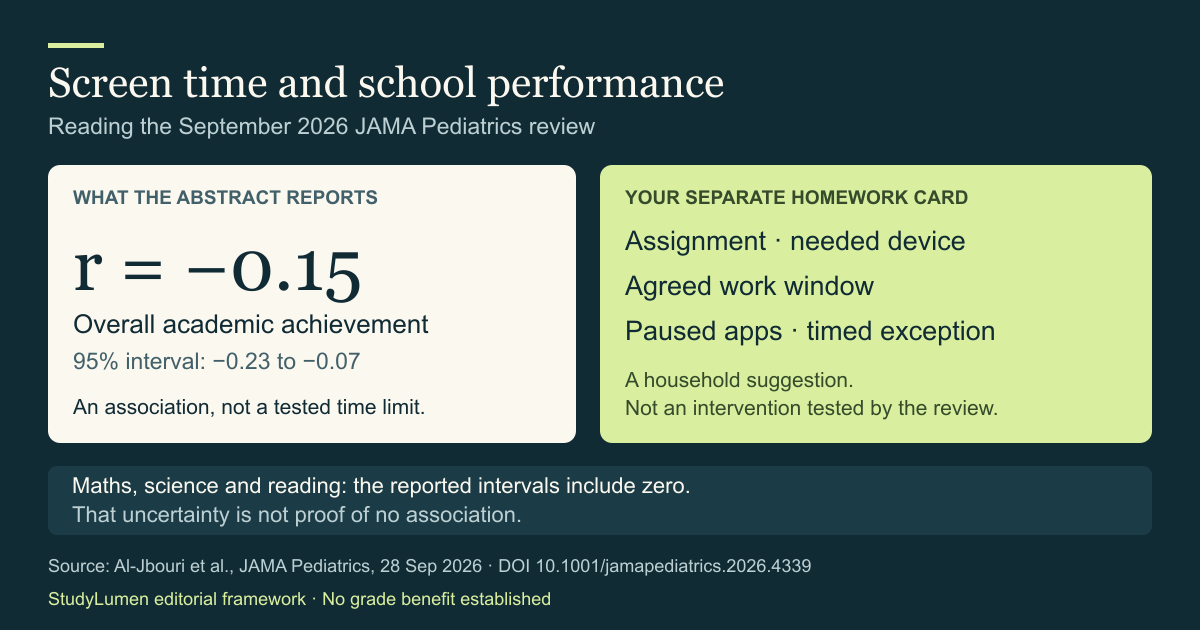
On September 28, 2026, JAMA Pediatrics published a review led by Elizabeth Al-Jbouri that found a negative association between screen use and overall academic achievement. Its abstract gives a pooled correlation of −0.15. That number describes a relationship in the research; it cannot choose tonight's apps or homework end time.
What the pooled school results show
An umbrella review brings together existing meta-analyses, which themselves combine results from earlier studies. The authors report 23 meta-analyses representing 2,817,252 children across 64 countries, aged 18 or younger. Their literature search ended on November 25, 2025. September 2026 is the publication date of the synthesis, rather than the date those children were all measured.
The publisher's abstract reports these academic and language estimates. Pearson's r is a correlation coefficient: a number between −1 and 1 describing the direction and strength of a linear relationship. Zero means no linear correlation.
Academic and language estimates reported in the JAMA Pediatrics abstract
- Outcome
- Overall academic achievement
- Pooled r
- −0.15
- 95% confidence interval
- −0.23 to −0.07
- What the interval shows
- The reported range stays below zero.
- Outcome
- Language skills
- Pooled r
- −0.14
- 95% confidence interval
- −0.18 to −0.10
- What the interval shows
- The reported range stays below zero; this is a different outcome from reading scores.
- Outcome
- Mathematics scores
- Pooled r
- −0.10
- 95% confidence interval
- −0.23 to 0.03
- What the interval shows
- The range includes zero and both negative and positive values.
- Outcome
- Science scores
- Pooled r
- −0.03
- 95% confidence interval
- −0.15 to 0.11
- What the interval shows
- The range includes zero and both negative and positive values.
- Outcome
- Reading scores
- Pooled r
- −0.02
- 95% confidence interval
- −0.12 to 0.09
- What the interval shows
- The range includes zero and both negative and positive values.
| Outcome | Pooled r | 95% confidence interval | What the interval shows |
|---|---|---|---|
| Overall academic achievement | −0.15 | −0.23 to −0.07 | The reported range stays below zero. |
| Language skills | −0.14 | −0.18 to −0.10 | The reported range stays below zero; this is a different outcome from reading scores. |
| Mathematics scores | −0.10 | −0.23 to 0.03 | The range includes zero and both negative and positive values. |
| Science scores | −0.03 | −0.15 to 0.11 | The range includes zero and both negative and positive values. |
| Reading scores | −0.02 | −0.12 to 0.09 | The range includes zero and both negative and positive values. |
A confidence interval keeps the uncertainty visible
The confidence interval expresses statistical uncertainty around an estimate. For overall academic achievement, the reported range is negative throughout. The three subject-score ranges extend across zero. Those rows leave room for a negative relationship, no relationship or a positive one.
An interval spanning zero cannot establish that screens have no relationship with that outcome. The Cochrane Handbook's reporting guidance explains why an uncertain estimate must not be presented as proof of no effect. The interval is also only part of an evidence judgment; it cannot settle questions about the quality or relevance of the underlying studies.
And −0.15 does not mean a 15% fall in grades. A correlation coefficient is a different measure from a percentage change. It supplies neither a forecast for one student nor the improvement that student would see if a parent shortened screen time.
The abstract leaves a homework question open
The accessible abstract gives no separate estimate for homework use and no tested household screen-time limit. That is the boundary of what we can report from it. Some included studies may have measured educational use; an omission from an abstract cannot establish what every study did or did not collect.
This explainer uses the publisher's abstract and its PubMed record. We have not reviewed the full paper or supplements. The reported association also leaves the direction of cause unresolved: it does not show that changing one household's phone rule will change its grades.
For tonight's assignment, ask which use the task actually needs. Reading a class message, uploading a worksheet and scrolling a feed are different activities, even when they happen on one device. The research estimates above do not make those choices for a family.
Put the homework decision on one card
The following card is our household planning suggestion. It is separate from the review's findings and carries no promise of academic improvement. Fill it in together before the assignment starts; leave a row blank if it is unnecessary that evening.
A household homework device card with an illustrative example
- Decision
- Assignment
- What to write
- The task that needs finishing.
- Illustrative example
- Complete the maths worksheet and submit a photo.
- Decision
- Needed device and tools
- What to write
- The device, apps and sites the assignment needs.
- Illustrative example
- Family tablet for the class portal and calculator.
- Decision
- Work window
- What to write
- The agreed start, end and check-in time.
- Illustrative example
- 4:30–5:00 p.m.; check progress at 5:00.
- Decision
- Paused uses
- What to write
- Games, feeds or other apps the task does not need.
- Illustrative example
- Pause games during the agreed window.
- Decision
- Exception
- What to write
- Who can approve extra access, for which task and until when.
- Illustrative example
- A supervisor can approve access to send the file until 5:10 p.m.
| Decision | What to write | Illustrative example |
|---|---|---|
| Assignment | The task that needs finishing. | Complete the maths worksheet and submit a photo. |
| Needed device and tools | The device, apps and sites the assignment needs. | Family tablet for the class portal and calculator. |
| Work window | The agreed start, end and check-in time. | 4:30–5:00 p.m.; check progress at 5:00. |
| Paused uses | Games, feeds or other apps the task does not need. | Pause games during the agreed window. |
| Exception | Who can approve extra access, for which task and until when. | A supervisor can approve access to send the file until 5:10 p.m. |
Those example times illustrate a completed card. They are not limits recommended or tested by the paper. If the school requires another tool or the task takes longer, revise the card around that need instead of treating the example as a rule.
Quiet notifications with the device's own controls
Keeping an app available and silencing its notifications are separate decisions. Google's Android guidance says Focus mode pauses selected apps and prevents their notifications while it is on. It also supports a schedule and a timed break.
Choose the paused apps so an essential class tool remains usable. Android notification settings and Do Not Disturb offer other ways to manage interruptions. Check the actual phone's settings; StudyLumen does not itself silence notifications.
Where StudyLumen fits
If your family wants to apply the card's agreed window on a supervised Android device, StudyLumen schedules routines that enforce selected app rules. Website filtering is optional. A temporary access approval ends at its recorded expiry, so an exception can have a clear finish time.
The app applies a routine your household chooses; the JAMA correlation does not determine that routine or establish a grade or concentration benefit. You can read about StudyLumen or use the card with the tools you already have.
Sources
- Al-Jbouri and colleagues, JAMA Pediatrics abstract, published September 28, 2026 — review methods, reported population and numerical estimates. DOI: 10.1001/jamapediatrics.2026.4339.
- PubMed record, PMID 42804186 — another record of the same paper, not independent evidence.
- Cochrane Handbook, Chapter III: Reporting the review — interpreting uncertain estimates without claiming proof of no effect.
- Android Help: Manage how you spend time with Digital Wellbeing — Focus mode, schedules, breaks and notification behavior.